

Payment Plans
Overview
Payment Plans allow you to break down your outstanding balances into manageable payments, giving end-customers a more affordable way to pay off their balance, reducing the churn rate for Aria clients. In this initial phase, we introduce capabilities to support collecting outstanding balances for struggling customers, in which case a payment plan is negotiated case-by-case depending on the customer's balance and financial situation.
For collection and dunning purposes, a payment plan provides new dates and due dates for a payment plan schedule created to pay past due invoices or charges while leaving financial reporting and revenue recognition untouched: the invoices or charges will retain their original billing dates or due dates.
If a subscription or a master plan instance is in dunning, creating a payment plan will automatically take it out of dunning.
Note: Learn more about how Aria applies payments to outstanding charges for accounts with payment plans, or how you can cancel a payment plan and create a new one with the remaining balance.

Customers with ongoing subscriptions must stay current on both their payment plan due and any new invoice obligations. Falling behind on either can place the account back to a dunning status.
You can set up a payment plan to pay off any account balance, whether past due or not yet due, supporting both self- and parent-pay accounts. Each payment plan has a 1:1 relationship with a Billing Group: it can only cover balances associated with subscriptions (master plan instances) under that Billing Group.
An example of how dunning behaves when an account has a payment plan but not keeping up with their new charges:

You set up a payment plan for an account by:
- Selecting specific invoices and transaction IDs to include.
- Choosing a billing group.
- Picking a payment plan type:
- Aligned: payment plan schedule follows the aligned master plan instance statement associated with the payment plan. Aria includes the due amount on the master plan instance anniversary statement.
- Independent: schedule is defined independently, and Aria notifies customers of the due amount via the payment plan due reminder template class.
- Defining the payment interval (frequency), period type (days, weeks, or months), and length.
- You can also assign different payment methods to pay for payment plans (other than those associated with the billing group).
- To support existing payment plans created on other systems, you can specify the custom sequence to start (for example, normally payment sequence starts with 1, with custom sequence; the payment plan sequence can start with sequence #5).
Note: For aligned payment plans, Aria treats any sequence assigned to a statement as notified immediately upon assignment, even if the statement has not yet been sent to the account. This prevents modifications to a sequence schedule after the sequence has been assigned to a statement.
- For independent plans, setting the start date and due day. If you do not specify these values, the system calculates the schedule using bill lag days plus days until due from the payment method or terms.
- Previewing the plan via API before the customer agrees.
Client Parameters
Before you set up payment plans, review the following client parameters. They control default behavior for payment plan creation, dunning, and customer communications. You configure each parameter on the Aria Core Client Parameter List page.
- Auto-Cancel Payment Plan on Missed Payments: Specifies the number of consecutive missed installment payments after which Aria automatically cancels the payment plan.
- Auto-send email when payment plan created: Controls whether Aria automatically sends an email message to the account holder when you create a payment plan.
- Dunning Option for Payment Plan: Specifies how dunning behaves when Aria fails to collect a payment plan due amount.
- Include Independent Payment Plan Due Reminder in XML Master File: Controls whether Aria includes the Payment Plan Due Reminder (PPD) class in XML Master File output.
- Optional dunning step customization: Controls the starting dunning step for a missed payment plan, relative to the invoice due date. The step is calculated as: Start Step = Last Dunning Step – Value. For example, if the invoice due date would place the subscription in the last dunning step (or suspension), setting the value to 1 will put the subscription in the second-to-last dunning step instead. By default (-1), the missed payment resumes dunning at the step aligned with the original invoice due date. If the value is invalid (less than -1 or greater than the total number of configured dunning steps), the system defaults to using the step determined by the invoice due date.
- Payment Plan Due Reminder XML statement schema version: Payment Plan Due Reminder XML statement schema version.
- Send Upcoming Payment Plan Due Reminder: Advance notifications to notify account holders of upcoming installment due.
Payment Management
Payment collection and payment application methods (First-In-First-Out, First-Due-First-Out, Manual, and Statement First-In-First-Out) support payment plans due.
Note: The system makes a single collection call to the payment processor when a statement includes both a payment plan due and new invoice obligations.
Similar to how Aria allocates payments to regular charges/invoices: when Aria receives a payment, it prioritizes applying the payment based on the payment application method specified in the client configuration (Configuration > Payments > Payment Settings > Default Payment Collection method) or specified by your customers via your user self-service portal.
Payment Plan APIs
Use the following APIs to create and manage payment plans on an account. Payment plans also support an optional financial fee, which you configure as a fee-type inventory item and reference when you create the payment plan.
- create_payment_plan_m: Creates a new payment plan for an account and lets you split the balance into scheduled payments over time. To include a financial fee on the payment plan, reference the fee-type inventory item using the <client_sku> field. You can also build the payment plan from a predefined payment plan term by passing <payment_plan_term_no> or <client_payment_plan_term_id>.
- get_payment_plan_list_m: Returns a list of all payment plans configured on an account, including the payment method and fee balance associated with each plan. Set <include_all_statuses> to true to also include completed, cancelled, or suspended plans.
- get_payment_plan_details_m: Returns the full details and schedule for a specific payment plan on an account, including the principal amount, fee amount, and total amount due for each installment.
- update_payment_plan_m: Updates an existing payment plan schedule on a specified account.
- create_payment_plan_term_m: Creates a reusable payment plan term at the client level. See Payment Plan Terms.
- get_payment_plan_terms_m: Returns the payment plan terms defined for a client. You can filter the results to a specific term or include inactive terms.
- edit_payment_plan_term_status_m: Activates or deactivates one or more payment plan terms. An inactive term cannot be applied to a new payment plan; existing payment plans created from that term continue unaffected.
Note: Payment plan installment schedule dates account for the lag days configured on the payment method linked to the payment plan. The lag days on the payment plan's linked payment method take precedence over the lag days on the billing group's payment method. If lag days are configured on the master plan instance, those take precedence over both.
Financial Fee for Payment Plans
You can charge your customer a financial fee when you create a payment plan. Aria calculates the fee on the installment balance (excluding any lump sum), allocates it proportionally across the payment plan sequences, and generates an invoice for the fee automatically.
Configure the financial fee as a fee-type inventory item using the following APIs:
- create_inventory_item_m: Creates an inventory item. Set the <item_type> field to 3 to create a fee-type item, then define the <fee_type> and <fee_structure_list> fields to specify how Aria calculates the fee.
- get_inventory_items_m: Returns the list of inventory items configured for your account, including fee-type items.
- get_inventory_item_details_m: Returns the configuration details for a specific inventory item, including the fee type and fee structure for fee-type items.
The <fee_type> field supports three calculation methods:
- P (Percentage-based): Aria applies the fee as a percentage of the installment balance.
- F (Flat): Aria applies the fee as a fixed amount for the payment plan.
- A (Amortized interest): Aria distributes the fee across installments so that earlier payments include a higher interest component and later payments include less, as the principal balance decreases.
Notes:
- Aria includes a generic "Financial Fee" global service, but you can assign any order-based service as the payment plan fee. See Create a Service for more information.
- Learn more about how Aria calculates Payment Plan fees.
Payment Plan Terms
A payment plan term is a reusable, client-level configuration that defines the length, interval, lump sum handling, and fee settings for a payment plan. Rather than specifying these values on every call to create_payment_plan_m, you can define a payment plan term once and reference it when you create a payment plan for an account.
To build a payment plan from a saved term, pass <payment_plan_term_no> or <client_payment_plan_term_id> on your call to create_payment_plan_m. You can still override any individual field the term would otherwise set. To clear a field inherited from the term, pass -9999 for that field.
Use the following APIs to manage payment plan terms:
- create_payment_plan_term_m: Creates a reusable payment plan term at the client level.
- get_payment_plan_terms_m: Returns the payment plan terms defined for a client. You can filter the results to a specific term or include inactive terms.
- edit_payment_plan_term_status_m: Activates or deactivates one or more payment plan terms. An inactive term cannot be applied to a new payment plan; existing payment plans created from that term continue unaffected.
Dunning
The system adjusts dunning once you create a payment plan: it assigns new due dates to the outstanding balance and only triggers dunning if the customer misses a scheduled payment. If services were already in dunning, the system removes them upon payment plan creation.
You can more precisely specify dunning behavior for payment plans via the dunning setting "Dunning Option for Payment Plan."
Note: After each dunning pass on a payment plan installment invoice, Aria now re-enables the invoice for billing batch processing regardless of whether the collection attempt was successful. This ensures that installment invoices remain available for collection in subsequent billing batch runs.
Communications and Event Notifications
New communications for both end customers and 3rd party systems have been introduced to support different lifecycles of payment plans, from payment plan creation, reminder due amount to the completion of payment plans.
Customer Notifications
Aligned Payment Plan: Anniversary Statement
For aligned payment plans, the due amount is communicated through the subscription (master plan instance) anniversary statement. New replacement strings and loops have been introduced to support this use case. To enable this, please contact Aria Customer Support to update your statement template.
Sample: Anniversary Statement with Payment Plan Due

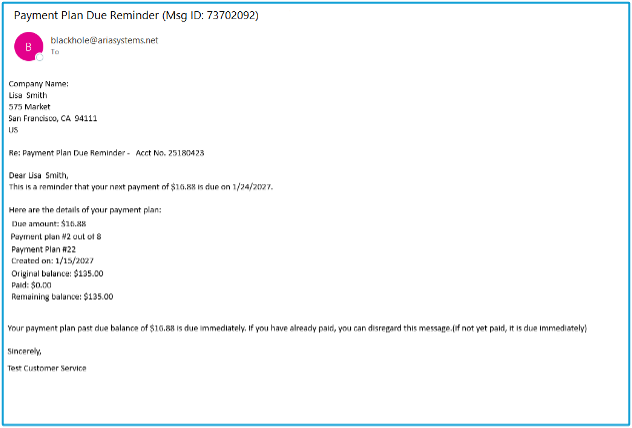
Independent Payment Plan: Payment Plan Due Reminder (PPD) Class
For independent payment plans, the due amount is communicated through the Payment Plan Due Reminder (PPD) class. The PPD class supports XML master files using Aria Notify Methods 15 (XML Master File and HTML Email) and 16 (XML Master File and Text Email).
Note: If you implemented on Aria before Release 66 (September 2025) and want to use independent payment plans, please contact Aria Customer Support to enable the Independent Payment Plan Due Reminder batch.
Sample: Payment Plan Due Reminder
Event Notifications
These notifications and events support payment plans:
- The "Account Payment Plan Created" event under "Account and Master Plan Instances."
- The "Payment Plan Due Reminder" email template class to notify customers of upcoming dues.
Note: Aria groups this email template class by account, billing group, and notification date. Therefore, Aria only sends one email reminder when an account's billing group has multiple payment plans with the same notify date.
- Strings and loops for statement templates to show upcoming payments due on anniversary statements.
- Support for bill lag days in payment terms and methods, which the system applies to payment plan notify dates and due dates.
Payment Plans Reporting
Aria runs a backend process to calculate and store estimated future notify and due dates for aligned payment plans and installments in a dedicated reporting table. You can report on this data via a request to Aria.