

Dunning Settings
Overview
You can specify dunning behavior in your Aria instance to ensure Aria handles your specific use cases as desired.
Dunning Settings
Getting here: Configuration > Settings > Payment Settings
Note: You can filter on the word "dunning" to display only dunning-related settings. 
| Setting | Current Value | Description |
|---|---|---|
| Allow Dunning during payment recovery | FALSE | This parameter determines whether the MPI (presumably a system or process) should be directed to the dunning process during the payment recovery phase. If the parameter is set to TRUE, the system will proceed to send a notification, thereby engaging the MPI in the dunning process. Conversely, if the parameter is set to FALSE, the MPI will bypass the dunning process entirely. By default, this parameter is set to FALSE, meaning the MPI does not engage with the dunning process unless explicitly instructed to do so. |
| Allow Master Plan Instance Cancellation While Master Plan Instance is in Dunning | Do Not Allow | This setting controls what happens when you try to cancel a Master Plan Instance (MPI) that is in the process of being reminded to pay (dunning). If you choose "Do Not Allow", you can't cancel the MPI at all while it's in the dunning phase. If you choose "Allow", you can cancel the MPI even while it's in the dunning phase. The default choice is "Do Not Allow". |
| Dun Plan For Non-Electronic Payment Terms Using Cumulative Past Due Balance | False | This setting determines whether plan instances with non-electronic payment terms, which are part of a billing group, should be included in the dunning process when the cumulative past due balance exceeds the dunning minimum threshold. If this option is set to TRUE, all plan instances within the billing group will be subject to dunning once the cumulative past due balance surpasses the specified dunning minimum threshold. |
| Dun on Orders for Electronic Payment Methods | False | This setting decides what happens when an unpaid (late) order is created, especially when the payment is supposed to be collected electronically. By default, the setting is True, meaning a late order invoice will start the dunning process. If the setting is False, a late order invoice will not start the dunning process. |
| Dun on Orders for Non-Electronic Payment Terms | True | This setting controls what happens when an unpaid order is created for Non-Electronic Payment Terms (this includes old Non-Electronic Payment Methods like Net Terms 30). If the setting is True, an unpaid order will lead to dunning. If the setting is False, an unpaid order will not lead to dunning. |
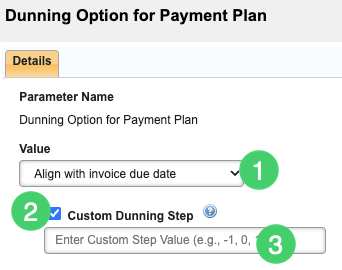
| Dunning Option for Payment Plan | Restart Dunning Process |
This setting specifies how Aria handles a missed payment for a payment plan relative to the associated dunning process. By default, the system will start the reminder process from the beginning with Step 1 ('Restart Dunning Process'). The other option is 'Align with Invoice Due Date', which puts the missed payment plan into the reminder step based on the original invoice date.
|
| Include Credit Memo in Dunning | FALSE | This setting determines whether credit memos should be taken into account during the dunning process. By default, the value is set to FALSE, meaning that credit memos are excluded from dunning consideration. However, if the value is changed to TRUE, credit memos will be included in the dunning process. |
Getting here: Configuration > Billing > Invoice Settings
| Setting | Current Value | Description |
|---|---|---|
| Skip Invoices with MPI In Dunning During Batch Collections | FALSE | Allows you to specify whether to exclude master plan instances (MPIs) that are in a dunning state from Aria's daily batch collection job. If you set the parameter to True, Aria will not attempt collection against MPIs in a dunning state during the batch job. If you set the parameter to False, Aria will attempt collection against MPIs in a dunning state during the batch job for any MPI that has a new, unpaid invoice. |