

- Click New to set up a Sovos-specific taxation configuration.
- Fill in all the required fields of a new taxation configuration (i.e. Status, Set Name, Set Description, and Countries).
For additional information, reference Create Taxation Configuration.
Note: Selected countries (in the right column) are the only countries that are included for taxing in the Sovos integration. All other countries (in the left column), are either taxed using another taxation method, or are not subject to any taxes.
Sovos (Legacy - Smart Tax)
Sovos is a global taxation company offering a full suite of cloud tax software compliance solutions designed to meet regulatory demands and promote business growth and greater organizational efficiency. Sovos helps you navigate an evolving, complex modern regulatory environment in which global authorities are requiring increased visibility, faster reporting and greater control of business processes, enabling you to accelerate revenue collection, reduce fraud, and close tax gaps.
Before You Begin
Make sure you have performed all the tasks described in Set Up Taxes.
Configuring Sovos Sales Tax
Getting Here: Click Configuration > Integrations > Taxation Configuration
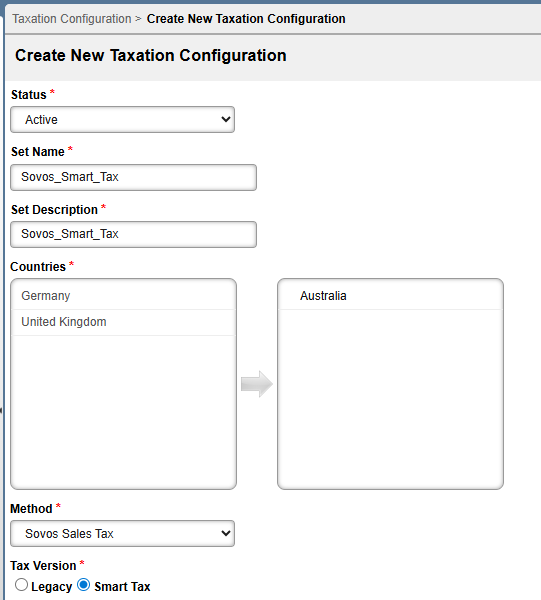
- Choose Sovos Sales Tax from the Method drop-down.
- Click either the Legacy or Smart Tax radio buttons at the Tax Version label depending on your desired integration.
Tax Group Configuration
This section appears as shown:

Complete eash section within the Tax Group Configuration based on the tax groups chosen. See below for information on what input is required for each section.
- Goods and Services Code: This is a code used to identify a product and/or service so they can be matched to the appropriate taxable category.
- Goods and Service Code Description: This is a description of the Goods and/or Service Code required for taxation calculation.
- Bill-From Location: Select the Bill-From Location used to calculate taxation (more information on how service locations are used within tax groups is available at this selection).
- Ship-From Location: Select the Ship-From Location used to calculate taxation (more information on how service locations are used within tax groups is available at this selection).
Tax Configuration Values
This section appears as shown:
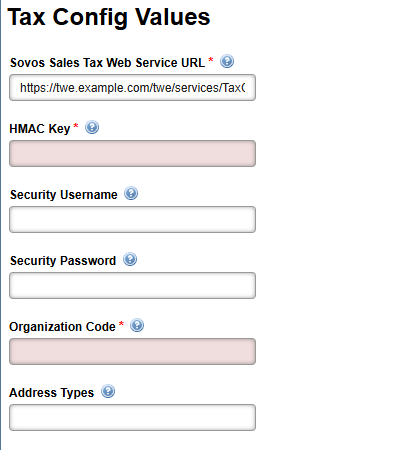
Configure the Tax Configuration Values section based on the tax groups chosen. For additional information on inputs to provide to each field, see below.
Note: The Tax Config Value fields are at the client level. If any information must be passed at the account level instead, configure account supplemental fields and use the Supp Field Override field.
- Sovos Sales Tax Web Service URL: This is the full URL for the tax service. In a testing environment, a sample URL might be:
https://partner.taxware.net/Twe/api/rest/calcTax/doc
- HMAC Key: A hash-based message authentication code used for security purposes.
- Security Username: The username for the tax API.
- Security Password: The password for the tax API.
- Organization Code: This is the code used to map business rules for taxation.
- Address Types: Address types listed in this field will be sent with the 'taxable address' of the account (billing, statement or account).
Press Save to retain your selections.