

Chase Paymentech
Chase Paymentech is a U.S.-based payment service provider and merchant acquiring business that is part of J.P. Morgan Chase, a multinational finance corporation. In addition to its payment services, Chase Paymentech provides associated business services such as analytics, payment fraud detection, and data security.
Features
- Tokenization
- Credit Card Processing (Authorization, Capture, Cancel, Reversal)
- Debit Card Processing (Authorization, Capture, Cancel, Reversal)
- 3DS Secure 1.0/2.0
- Refunds (Full and Partial)
- Level 2/3 Data
- Account Updater (Batch or Real Time)
- Soft Descriptor
UI Configuration
- ► Merchant Account Details
-
The Merchant Account Details tab appears as shown:

This screen contains the following fields:
Field Description Division Code This field contains the Merchant ID (MID) number assigned to you by Chase Paymentech. This is your Salem Division number. The MID may also be referred to as the Transaction Division (TD) code or Presenter ID. This is a 6-digit numeric MID while the Orbital Gateway (Tampa Platform) uses a 12-digit numeric MID. Merchant Location Code This field indicates the Merchant location. For example, the European region will be populated as"EU." For the United States, it is "USA," and for Canada, it is "CAN." Merchant Division Country Code (ISO 3166-1 alpha-3) This is the Country Code (ISO 3166 alpha-3) associated with this merchant division. For example, the United States would be populated as "USA." Merchant 3DS Enabled This field specifies if a Division Code is enabled for 3D Secure with Chase Paymentech. If selecting "True," the Division Code is enabled for 3D Secure. If specifying "False," the Division Code is NOT enabled for 3D Secure (False is the default).
- ► Processing Options
-
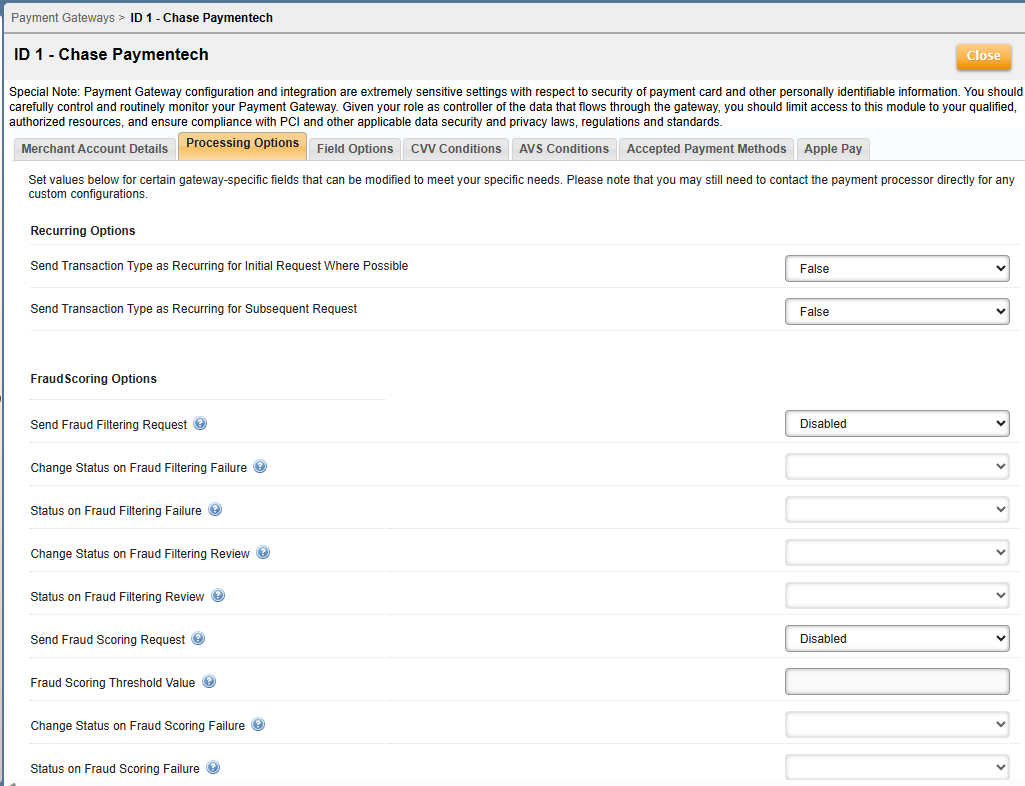
The Processing Options tab appears as shown:

This screen contains the following fields:
Field Description Recurring Options Send Transaction Type as Recurring for Initial Response Where Possible Initial and Recurring transaction types are automatically set to Recurring when the field values are set to “True” under the Recurring options settings in the UI (when creating a Payment Gateway). This feature may result in lower transaction fees (False is the default). Send Transaction Type as Recurring for Subsequent Request Fraud Scoring Options Send Fraud Filtering Request This parameter governs the behavior to send a request to Chase Paymentech Salem to return fraud filtering information. If a card prefix, card number, or the issuing country is on a fraud filter report, the appropriate error response will be returned from Chase Paymentech and can be used to deny a transaction. Change Status on Fraud Filtering Failure This is a flag that indicates that the status controlled by "Status on Fraud Filtering Failure" should be changed if the fraud filtering request returns a failure response. Set it to False if changing status is not desired. Status on Fraud Filtering Failure This should only be set if Change Status on Fraud Filtering Failure is set to True. This must be a valid Master Plan Instance status code. Master Plan Instance status codes can be found in the API documentation. Change Status on Fraud Filtering Review This parameter will change the status on the Master Plan Instance(s) to "Status on Fraud Filtering Review" if set to True and the Fraud Filtering parameter is enabled. Status on Fraud Filtering Review This parameter governs the behavior for changing the status when Fraud Filtering is enabled and Change Status on Fraud Filtering Review is set to True. Send Fraud Scoring Request This parameter governs the behavior to send a request to Chase Paymentech Salem to return fraud scoring information. If the fraud scoring information returned is below the Fraud Scoring Threshold based on Chase Paymentech configured parameters, Aria will modify the status based on the "Change Status on Fraud Scoring Failure" setting. Fraud Scoring Threshold Value This parameter is the threshold such that Aria will not send a transaction to Chase Paymentech if the Fraud Scoring parameter is enabled and the Fraud Score returned is greater than or equal to this value. Change Status on Fraud Scoring Failure This parameter will change the status on the Master Plan Instance(s) to "Status on Fraud Scoring Failure" if set to True and the Fraud Scoring parameter is enabled. Status on Fraud Scoring Failure This parameter governs the behavior for changing the status when Fraud Scoring is enabled and the Change Status on Fraud Scoring Failure is set to True. Enhanced Auths Enhanced Auths Marketing This parameter governs the behavior to send a request to Chase Paymentech to return Enhanced Auths Marketing information. The values returned by Chase Paymentech are informational only. 3DS Authentication Settings Authentication API URL The API endpoint used to reach the Chase JPM PP. Merchant ID Unique identifier issued to the merchant by the payment provider to perform 3DS Authentication in the Chase JPM PP. Authentication API Password The password used to authenticate the Merchant ID. 3DS Termination URL URL on the merchant website that is invoked after completing the payer authentication process. SCA Exemption Exemption Type An exemption reason to bypass strong customer authentication. The exemption will apply to all transactions. The default is 'No Exemption.' Chase AU Response Code Handler Settings Response Code Q Action Response Code Q indicates that the customer should be contacted regarding the use of their credit card. Aria recommends contacting the customer; however, you may also choose a default action when this code is received for the Account Updater. The default is 'No Action Required.'
- ► Field Options
-
The Field Options tab appears as shown:


This screen contains the following fields:
Field Description soft_descriptor Transaction description shown on the buyer's credit card statement that displays a Merchant Name or Item Description. This allows up to 22 alphanumeric characters (ACH is up to 15). Some fields are reserved based on a fixed "company identifier" and will truncate any additional characters. Do not use a caret (^), backslash (\), open bracket ([), closed bracket (]), tilde (~) or accent key ('). soft_descriptor_customer_service Transaction description shown on the buyer's credit card statement that displays a City for 'Card Present' transactions or a phone number for 'Card Not Present' transactions. This allows up to 13 alphanumeric characters (ACH is up to 10) with one of three options available based on formats and will truncate any additional characters. Do not use a caret (^), backslash (\), open bracket ([), closed bracket (]), tilde (~) or accent key ('). AU_days_prior_to_invoice Number of days prior to next bill date that an account can be queried for Account Updater. AU_update_interval Configurable number of days after which an account updater request must be sent. AU_cards_to_update Card types that are allowed in Account Updater. Values are "None," "Visa," "Mastercard," and "Visa Mastercard." AU_Merchant_Company_Number The merchant company number assigned by Chase Paymentech that should be used for the Account Updater batch. AU_Division_Code_US The division number assigned by Chase Paymentech that should be used for the Account Updater batch for US/Canada accounts. AU_Division_Code_EU The division number assigned by Chase Paymentech that should be used for the Account Updater batch for EU accounts. vat_federal_tax_id Customer Tax Registration Number/Merchant VAT ID for Great Britain and Ireland, or the Canada registration ID. state_province_tax_id Canada provincial sales tax registration number ship_from_zip_code The zip/postal code of the location from which the goods are shipped customer_ani Automatic Number Identification - This is a service that provides the receiver of a telephone call with the number of the calling phone. customer_ip_address IP address used to place the online order. customer_browser Web browser that was used to place online order. customer_udf User Defined function used in Shopping Carts that specify what was ordered. order_shipping_method Order Shipping Method as part of an online order. Please see applicable payment gateway/processor documentation for format of this field if not passing in via an API. customer_personal_information Personal information (e.g., PayPal Account Number) captured as part of an online order when PayPal is used via this payment gateway/processor. fraud_merchant_id Fraud Merchant ID which is often not the same as your payment processor merchant ID. customer_gender Gender of the customer. Allowable values: F - Female, M- Male. website_short_name Short name for the merchant's website.
- ► Apple Pay
-
The Apple Pay tab appears as shown...

More information on configuring Apple Pay payments is here.
Supported Functionality
Basic Supported Features For Smart Payments
Chase Paymentech Basic Smart Payments features include the following:
- Credit Card and Tokenized Credit Card online payments, including the following card brands:
- VISA
- Mastercard
- American Express
- Discover
- Diners Club/Carte Blanche
- International Maestro*
- China UnionPay (for tokenized cards - pay method 13)
- Japan Credit Bureau (JCB)**
- Payment Authorization for Chase Online payments using a credit card or token
- Query Token action using the token (<bill_agreement_id>)
- Payment Capture of previously authorized transactions
- Credit Card Authorization Reversal (implemented via the Aria UI and the reverse_authorized_electronic_payment_m API)
- Refund of a previously authorized transaction back to the customer's original method of payment
- Soft descriptor support for descriptions accompanying credit/debit transactions to appear on customer's bank statements for Online payments
- 3DS Authentication for VISA and Mastercard payments (settlement in batch)
- Fraud scoring and fraud filtering (including 3DS support for VISA and Mastercard using the validate_acct_fraud_scoring_m API)
- CIT (Customer-Initiated Transaction)/MIT (Merchant-Initiated Transaction) Indicator (implemented through the <recurring_processing_model_ind> input of the authorize_electronic_payment_m API for Online payments)
- Transaction logging supported for the following actions: create token, authorization, payment, and authorization reversal
- CIT/MIT Recurring Indicators via the <recurring_processing_model_ind> input you can specify in the following APIs to flag recurring transactions as desired:
Note: The Recurring Payment indicator can now be overridden through the Collection Group and Payment Gateway configuration settings (Configuration > Payments > [Payment Gateways/Collection Groups] > Processing Options tab > Recurring Options).
*-Authorization reversals are now supported for International Maestro, sending the transaction type as 7 (value is null for other card brands).
**-JCB cards now support flags for Customer-Initiated Transactions (CIT) and Merchant-Initiated Transactions (MIT); these Chase-specific recurring flags will now be sent for transactions via this card type. Please note that JCB cards are processed via Discover by Chase and this applies to U.S. transactions only.
Advanced Supported Features for Smart Payments
As part of Aria's Smart Payments integration with Chase Paymentech, advanced features, including Level 2 and Level 3 payment data, are now supported. Support for the ACH, BACS and SEPA payment methods along with Strong Customer Authentication (SCA) exemptions have also been added to the set of advanced features for Chase Paymentech.
Additional details are provided as follows:
- Automated Clearing House (ACH) online payments are available specifically for the U.S. and Canada, mapped to payment method 2). ACH batch settlement is also included.
- Single Euro Payments Area (SEPA) direct debit online payments are now supported also (payment method 26, IBAN indicator: 1). SEPA batch settlement is also included.
- Bankers' Automated Clearing Services (BACS) direct debit online payments are now supported also (payment method 26, IBAN indicator: 0). BACS batch settlement is also included for one-time and recurring online transactions.
- For the Real-Time Account Updater (VISA only), Aria supports the following response codes from Chase Paymentech:
- J—New card number and new expiry date found
- A—New card number found
- E—New expiry date found
- Q—Contact cardholder (similar to the Batch Account Updater in the legacy Chase Paymentech integration, the Processing Option “Response Code Q Action” in the Collection Group/Payment Gateway configuration will apply to Real-Time account updates as well).
- Low-value payment SCA exemptions are now supported for eligible transactions within Chase Paymentech Smart Payments based on the SCA exemption type indicator at the Payment Gateway or Collection Group level (this is for batch settlement; the low-value threshold is based on issuer policies).
Chase Paymentech's Advanced features also includes Level 2 and Level 2 data support, as shown:
| Level 2/Level 3 | Line Item Level/Order Level | Record | Card Brands |
|---|---|---|---|
| Procurement Level 2 (Batch) | |||
| Line Item Level Data | PPC002 | All card brands* | |
| Procurement Level 3 (Batch) | |||
| Order Level Record Data | PP0001 | VISA, Mastercard | |
| Line Item Level Data | PP1, Record 1 | Mastercard | |
| PP2, Record 2 | |||
| PP1002, Record 1 | VISA, Discover, Diner's Club | ||
| PP2002, Record 2 |
*—Only Level 2 data supported for American Express
Level 3 data is now supported by Chase Paymentech for the Mastercard and Discover card types. This applies to the following pay records:
| Card Type | Record | Description |
|---|---|---|
| MasterCard | PP0 | Freight amount and duty amount fields are now filled with zeros instead of leaving them empty/space. |
| PP2 | Unit cost and item commodity code are now populated for all the countries and currency transactions. Unit cost must be included when sending Level 3 data. | |
| Discover | PP2 | The tax amount is included in the line-item total when sending Level 3 data. |
Apple Pay Payments
The following Apple Pay payment types are supported as shown:
| Apple Pay type | Online | Batch |
|---|---|---|
| Initial and subsequent payments | X | |
| External payment payloads - one time and recurring transactions (pay method=47) | X | |
| Refunding a previously captured Apple Pay transaction back to the customer's original payment method | X | X |
Apple Pay Shipping Contact Details
The following Apple Pay shipping contact details are now extracted and stored within Aria when recording a payment:
- ship_fname
- ship_lname
- ship_addr_ln1
- ship_addr_ln2
- ship_addr_ln3
- ship_city
- ship_state
- ship_zip
- ship_country
- ship_email
- ship_phone
Note: These fields will be populated only if the corresponding data is present in the external payment payload.
<proc_status_text> API Note
The <proc_status_text>
Supported Actions for Batch AU Receiver
The following actions are now supported for the Chase Batch Account Updater (AU) Receiver:
| Letter | Action | Feature |
|---|---|---|
| A | Update new card number |
|
| C | Close account advice |
|
| E | Update expiry date |
|
| Q | Contact cardholder advice |
|
Response File Error Handling
Files with the following error codes are handled and logged appropriately:
| Code | Definition | Status | Action |
|---|---|---|---|
| 6782 | Batch file name already exists in the database | Error | Fix |
| 6785 | User is currently set to inactive in the database | Error | Resend |
| 6787 | The sender has sent more than one file per zip | Error | Fix |
| 6799 | The name of the zip file and the payload file zipped inside do not match | Error | Fix |
| 6801 | Zip file needs to be encrypted | Error | Fix |
| 6810 | File name is too long | Error | Fix |
| 6815 | Presented ID is not valid for this user | Error | Fix |
Other Features
- Non-ASCII characters sent in the Chase batch are now replaced with a dot (.) per the Chase batch specification. This applies to the following fields:
- first_name
- last_name
- middle_initial
- address1
- address2
- city
- state
- zip
- country
- Aria now honors multiple company codes for Chase configured within the payment gateway and collection account group levels. All the collection account groups (plus the payment gateway) are grouped based on the company code and sent as a file per company code basis.
- Aria also now displays enhanced authorization information in API responses and also in the UI using additional information received in the CT02 record from Chase, including the following fields:
- prepaid_ind
- prepaid_card_type
- affluence_type
- issuing_country
- card_product_type
- signature_debit_ind
- pinless_debit_ind
- durbin_regulated_ind