

Mediation Reprocess
The Mediation Reprocess tab lets you reprocess usage records that failed during mediation. Mediation rules—including filter, enrichment, splitting, and aggregation rules—are configured in rule files per source platform, service type, and usage record type. If an incorrect rule file causes mediation errors, upload the corrected rule files and then use this tab to reprocess the affected records.
Access Mediation Reprocess
- Click the Usage switch in the navigation pane.
- Click Usage Activity to expand the sub-menu.
- Click Usage Suspense.
- Click the Mediation Reprocess tab.
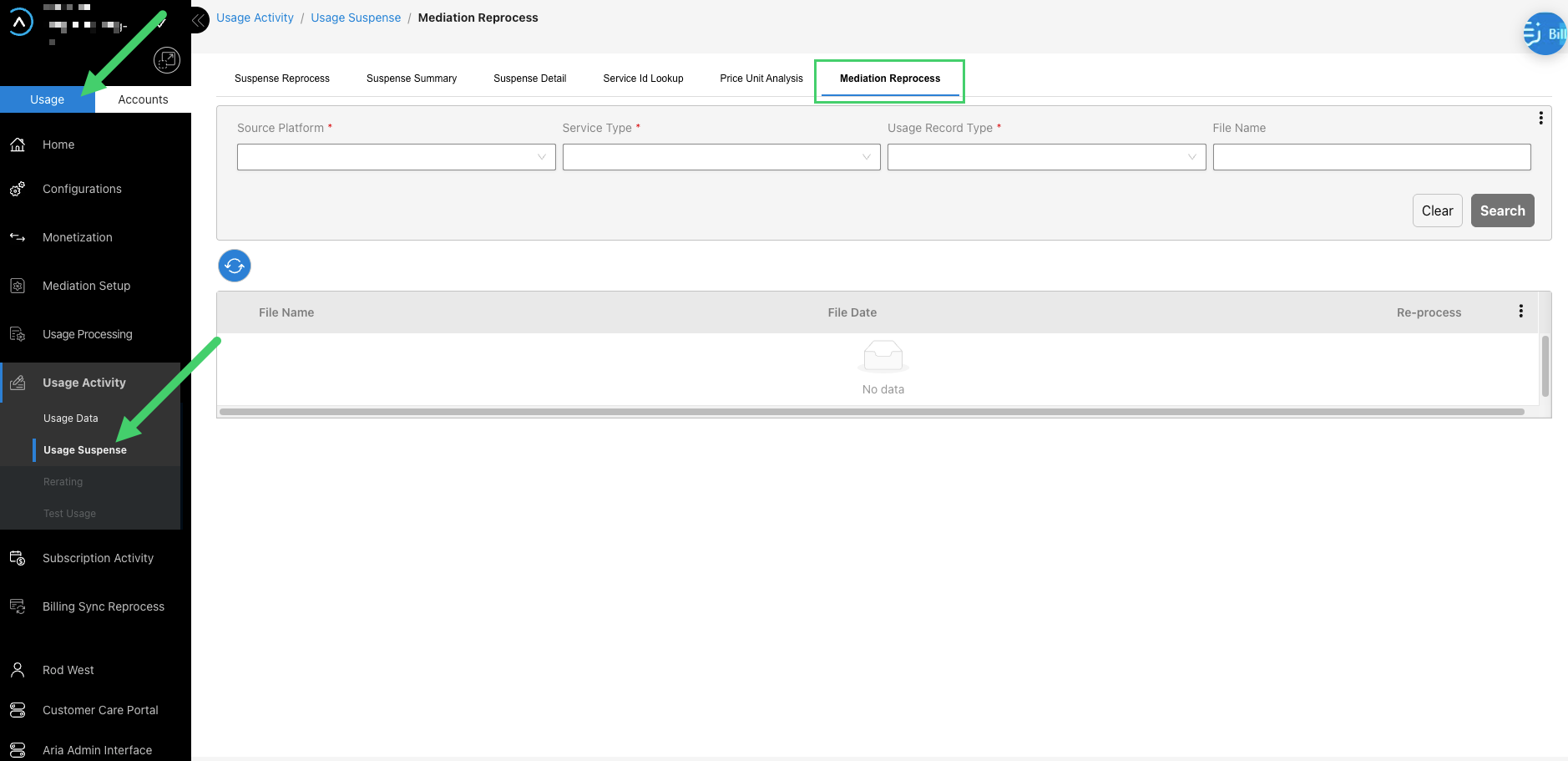
Filter Mediation Reprocess
- Source Platform—select a source platform from the dropdown. Exact match.
- Service Type—select a service type from the dropdown. Exact match.
- Usage Record Type—select a usage record type from the dropdown. Exact match.
- File Name—enter a partial or full file name. Case-insensitive partial match.
Reprocess Mediation Failures
- Navigate to the Mediation Reprocess tab as described above.
- Apply filters to locate the file.
- Expand the file row using the Maximize icon or click the File Name link to open the detail drawer.
- Confirm the corrected mediation rule files are in place, then use the reprocess controls to reprocess the affected records.