

Nets Netaxept
Nets Netaxept is a payment solution provided by Nets that allows businesses to accept payments online, in-app, and vai call centers. It supports all currencies and selected card brands, enabling transactions from customers worldwide. To use Netaxept, you need to register for a Nets Netaxept account, which will allow you to manage your payment transactions effectively.
Features
- Payments (including One-Time Payments)
- Authorization
- Capture
- Authorization Reversal
- Refund
Nets Netaxept supports the following card brands:
- VISA
- MasterCard
- American Express
- Diner's Club
- Dankort
- Maestro
- Japan Credit Bureau (JCB)
$0/$1 Authorizations
All card types except Diners supports $0 authorization. For Diners, only $1 authorization is supported (action is reversed automatically).
Soft Descriptor Support
Aria has introduced the soft_descriptor UI field option for Nets Netaxept (Configuration > Payments > Payment Gateways/Collection Groups > Field Options). The maximum allowed character length for soft descriptor in Nets is 1500 (truncation is handled by Nets Netaxept). This value is sent for Authorization and Payment transactions.
CIT/MIT Support
Cardholder-Initiated Transaction (CIT) and Merchant-Initiated Transaction (MIT) support has been added for Credit Card payments. The <recurring_process_model_indicator>
| <recurring_process_model_indicator> | <transaction_type>* | CIT/MIT |
|---|---|---|
| 0 | - | CIT (Unscheduled) |
| 1 | - | CIT (New) |
| 2 | 1 | MIT (Scheduled Recurring) |
| 3 | 1 | MIT (Unscheduled) |
*-For recurring transactions
- Transaction Logging has been added for the following (for the Credit Card PM-1):
- Authorization, payment, capture, reversal, refund (partial and full), 3DS Authorization and auto reversal actions.
- Capture of log success and failure scenarios.
- Capture of logs for all supported card types.
- Masking of sensitive data in logs.
- Capture of logs by type (Full, Summary, Error, and None)
- Direct Post is also supported for Nets Netaxept Smart Payments (PM-1).
Tokenized Card Payments Also Supported
Nets Netaxept supports Tokenized Credit Card payments for the Visa, Mastercard, American Express, Diners and Dankort card types. The following actions are supported for this payment type:
- Create Token
- Query Token
- Authorizations (both 3DS and non-3DS)
- Reversal
- Capture
- Payment
Tokenized Credit Card payments also support Cardholder-Initiated Transactions (CIT) and Merchant-Initiated Transactions (MIT). Additionally, Aria sends soft descriptor values at both the Payment Gateway and Collection Group UI screens; a maximum field value of 1,000 characters is allowed (Configuration > Payments > Payment Gateways/Collection Groups > Field Options).
3DS and SCA Exemption Error Handling
During 3DS authorization, Aria internally invokes Nets’ Terminal API, which returns HTML content with an HTTP status code of 200.
In frictionless or SCA exemption scenarios, Nets returns an authentication-skipped HTML response (containing a redirect link with responsecode=OK) along with an HTTP status code of 302, which is still considered a successful outcome. Aria checks for the returned response in such cases and validates it using the returned Transaction ID and the response code, and return the successful/ failure responses accordingly.
Direct Post Support
3DS Authorization and SCA Exemption are supported by Direct Post.
<cc_id> Added to <query_token> NETS API response
The query_token response has been enhanced to include the card type (cc_id) using the Issuer field value from the NETS API response. As with the SCA Exemption, all card types are supported.
Enhanced Transaction Logging
For Tokenized Credit Card payments, transaction logging has been added for the following actions:
- Create_token
- Query_token
- Authorizations
- Reversals
- Capture
- Payment
- Refund
- 3DS
This applies to initial and recurring transactions, as well as 3DS, non-3DS, success and failure scenarios. All card types listed for the SCA Exemption and Query Token enhancements are applicable for logging also, with logs captured based on the Full, Summary, Error, and None logging types.
UI Configuration/Processing Options Tab
The Merchant Account Details tab appears as shown:
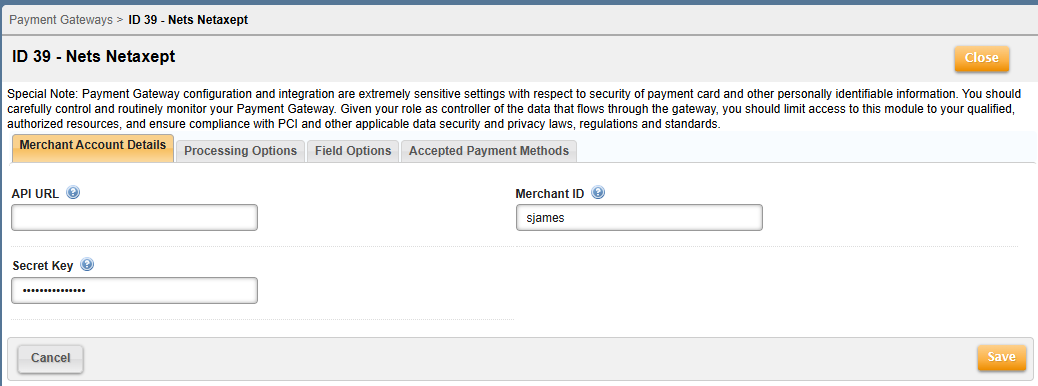
This tab contains the following fields:
| Field | Description |
|---|---|
| API URL | This is the Netaxept endpoint URL used to make API calls. It is required at either the Payment Gateway or Collection Group level. The Collection Group value supersedes the Payment Gateway level value. |
| Merchant ID | This is the unique ID generated by Nets for identifying each merchant in Netaxept. This ID needs to be sent to Netaxept for all API calls. |
| Secret Key | This is the shared secret key between the merchant and Netaxept that is used to authenticate the merchant and is provided to you by Netaxept. |
The Processing Options tab appears as shown:
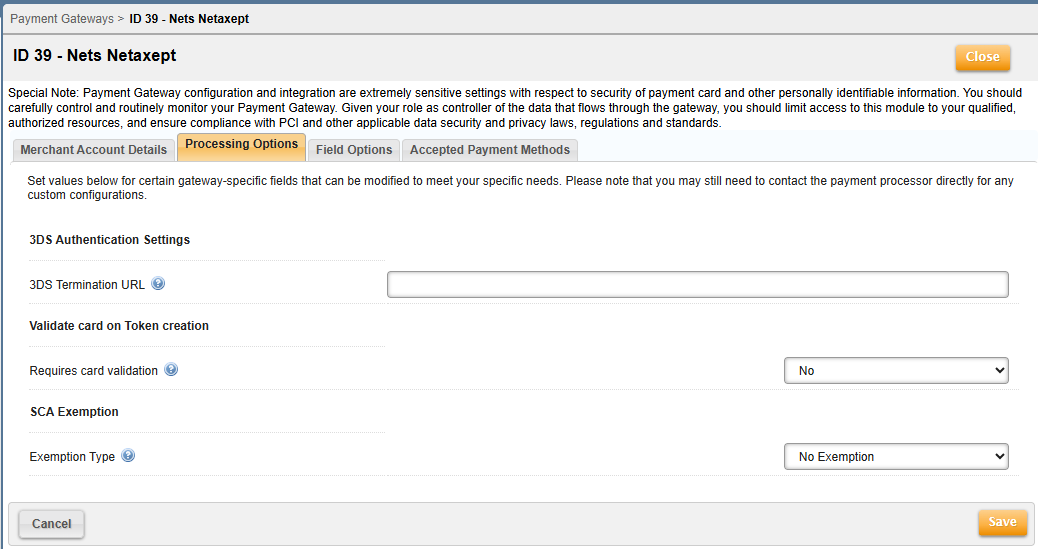
This tab contains the following fields:
| Field | Description | ||||||||
|---|---|---|---|---|---|---|---|---|---|
| 3DS Termination URL | This is the URL the customer will be redirected to after completing the payer authentication. You must specify the Merchant website URL in the Payment Gateway/ Collection group UI screen (which will get invoked when the shopper challenge is complete). The three-step process for Nets Netaxept 3DS authentication appears below. | ||||||||
| Requires card validation | This is the option to validate a card during token creation using a minimal authorization amount. The default is No. Please note that we will immediately reverse the minimal amount used for verification. | ||||||||
| SCA Exemption/Exemption Type |
This is an exemption reason to bypass strong customer authentication. The exemption will apply to all transactions. The default is No Exemption. This has been added for the Credit Card pay method (PM=1) as well as the Tokenized Credit Card pay method (PM=13) for all supported card types (Visa, Mastercard, American Express, Dankort, and Diner's Club). You can skip the 3DS pop-up message when the SCA Exemption flag is enabled. The exemption amount for Nets Netaxept is <=30 EUR. You can also set the <sca_exemption_type> value via the authorize_electronic_payment_m API at the <proc_field_override> array. Select from one of the following values:
|
Nets Netaxept 3DS authentication is a three-step process, as follows:
Step 1: Execute the authorize_electronic_payment_m or update_payment_method_m api with credit card details, billing address details and <attempt_3d_secure> as 'true' to perform client authentication, then the api will return the <proc_payment_id> (as the outer level output field) and <pa_3ds_form_content> (form value in the <proc_3dsecure_data/proc_3dsecure_auth_data array>) in the response.
Step 2: Use the Form value and save it as an html page and execute it. A challenge/redirect window pops up based on the 3ds transaction details; you then must submit the challenge/redirect form to end Step 2.
Step 3: Execute authorize_3dsecure_m with the <proc_pymnt_id> (from step 1), perform the authorization and verify the API result to complete the 3ds authentication-based authorization.
The Field Options tab appears as shown:
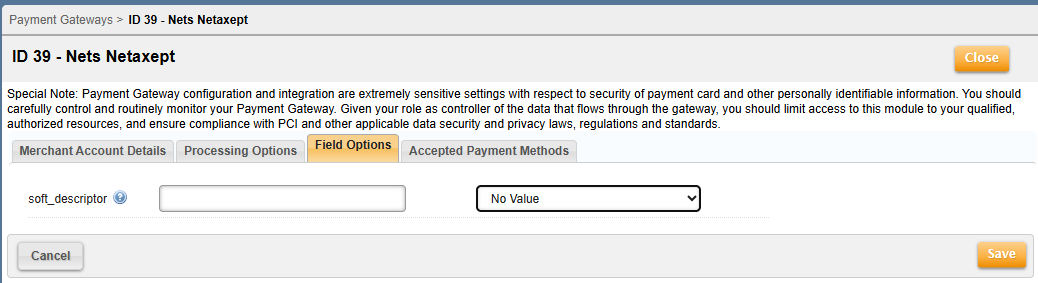
This tab contains the following field:
| Field | Description |
|---|---|
| soft_descriptor | This is a fre-format textual description determined by the merchant for the transaction. This can be HTML-formatted. Unlike the other fields, the order description will not cause the call to fail if it exceeds the maximum length. Rather, the field will be truncated to its maximum length (1500 characters). |