

Cybersource
Cybersource is a global payment gateway supporting a host of popular payment methods, providing online payment and fraud management services to small businesses as well as medium and large-sized merchants. Cybersource is firmly established within the ecommerce space, with more than 450,000 businesses using Cybersource worldwide (and Authorize.net, acquired by Cybersource). Cybersource has offices throughout the United States, Asia, Europe, Latin America, the Middle East, and Africa.
Features
Aria's Cybersource Smart Payments integration includes the following:
- Customer-Initiated Transactions (CIT) and Merchant-Initiated Transactions (MTI) for the Visa, Mastercard, and Discover card brands
- Fraud detection, ensuring relevant data is sent to Cybersource when fraud scoring is enabled (details below)
- Actions listed in the following table:
| Action | Credit Card (pay method = 1) (VMAD)* | Tokenized Credit Card (pay metod = 13) (VMAD)* |
|---|---|---|
| Payment Authorization | x | x |
| Payment Capture | x | x |
| Payment | x | x |
| Auth Reversal | x | x |
| Refund | x | x |
| Create Token | x | |
| Query Token | x | |
| $0 Authorization | x | |
| Fraud Support | x | x |
*-Visa (001), Mastercard (002), American Express (003) and Discover (004)
UI Configuration/Processing Options Tab
The Merchant Account Details tab appears as shown:
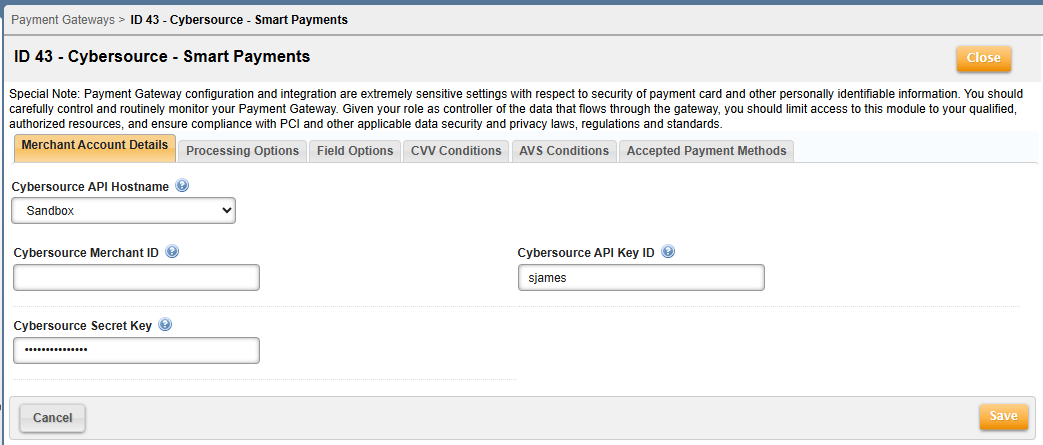
For the Payment Gateway and Collection group configurations, the Merchant Account Details tab contains the following fields (for the REST method collection):
| Field | Description |
|---|---|
| Cybersource API Hostname |
This field is a drop down with “Sandbox” or “Production”; based on this option, Aria will use the hostname internally. If you choose “Sandbox”, Aria will use the following: apitest.cybersource.com If you choose “Production”, Aria will use the following to submit the payment request: api.cybersource.com Note: If you are testing in the Stage environment, you can use the “Sandbox” option. If you are using Cybersource Smart Payments in production, you must choose “Production.” Based on the selected option, Aria will send the payment request to the relevant endpoints. |
| Cybersource Merchant ID | This ID is a unique value given to you by Cybersource when creating a merchant with Cybersource. You must provide the merchant ID here so the payment will be attempted for this merchant. |
| Cybersource API Key ID/Cybersource Secret Key | These two fields are used for authenticating the merchant during the payment request. As Cybersource Smart Payments utilize the REST Integration flow, you need to create the Cybersource API Key ID and Cybersource Secret Key from the Cybersource portal and map them to Aria. |
The Processing Options tab appears as shown:
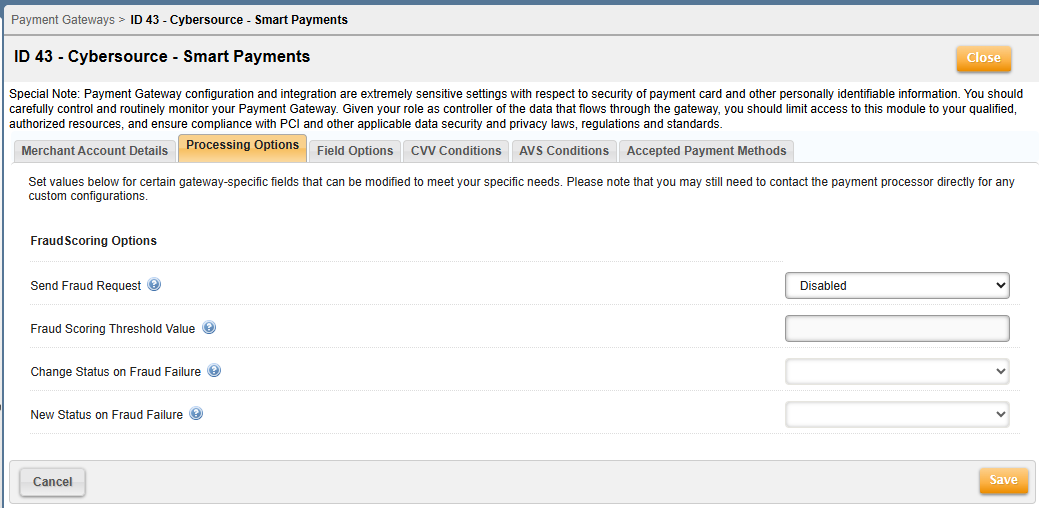
The Processing Options tab contains the following fields (for Fraud Scoring options):
| Field | Description |
|---|---|
| Send Fraud Request | This parameter governs the behavior to send a request to Cybersource Fraud Protection to return fraud information. If the Fraud response is Failed or Review, Aria will modify the status based on the "Change Status on Fraud Failure" setting. |
| Fraud Scoring Threshold Value | This defines the Threshold value. Based on the fraud score received from Cybersource, the value will be compared with the threshold at the time of fraud failure and change the status on the Account to "New Status on Fraud Failure." |
| Change Status on Fraud Failure | This parameter will change the status on the Account to "New Status on Fraud Failure" if set to True and the Fraud parameter is enabled and the resultant Fraud response is Not Successful. |
| New Status on Fraud Failure | This parameter governs the behavior for changing the status when Fraud is enabled and Change Status on Fraud Failure is set to True. |
The Field Options tab appears as shown:
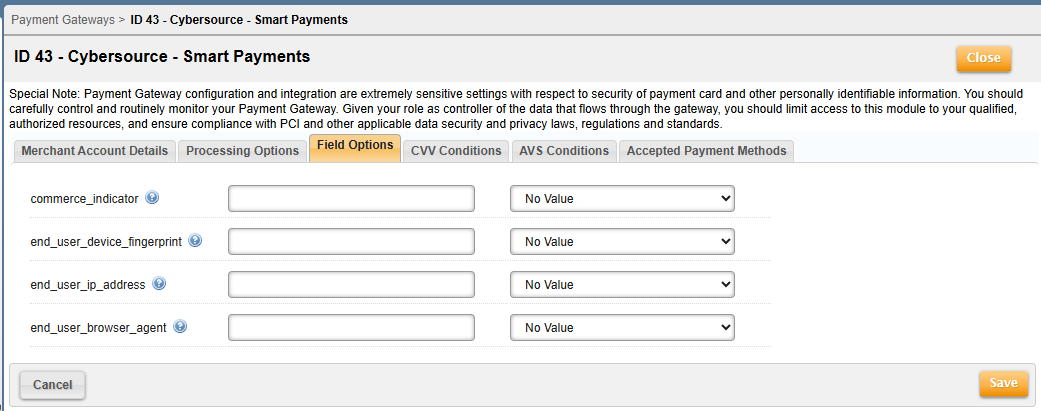
The Field Options tab contains the following fields for fraud scoring:
| Field | Description |
|---|---|
| commerce_indicator | This represents the recurring billing indicator (values are Sales Rep, Tax Exemption Number, Account Type, and VAT ID...values can be selected from other fields at this screen). |
| end_user_device_fingerprint | Information from a shopper's device that uses a combined value to identify the device of the shopper |
| end_user_ip_address | IP address of the customer for which the action is being performed. This value is used for fraud prevention. |
| end_user_browser_agent | User agent of the client's web browser. This can be used for statistical purposes but also to perform anti-fraud checks on transactions. |